How a Loan Approval Prediction System Works – A Real-Life Machine Learning Project
Published: 27 Aug, 2026 | Author: CCI Admin | Category: Python / Machine Learning / Projects
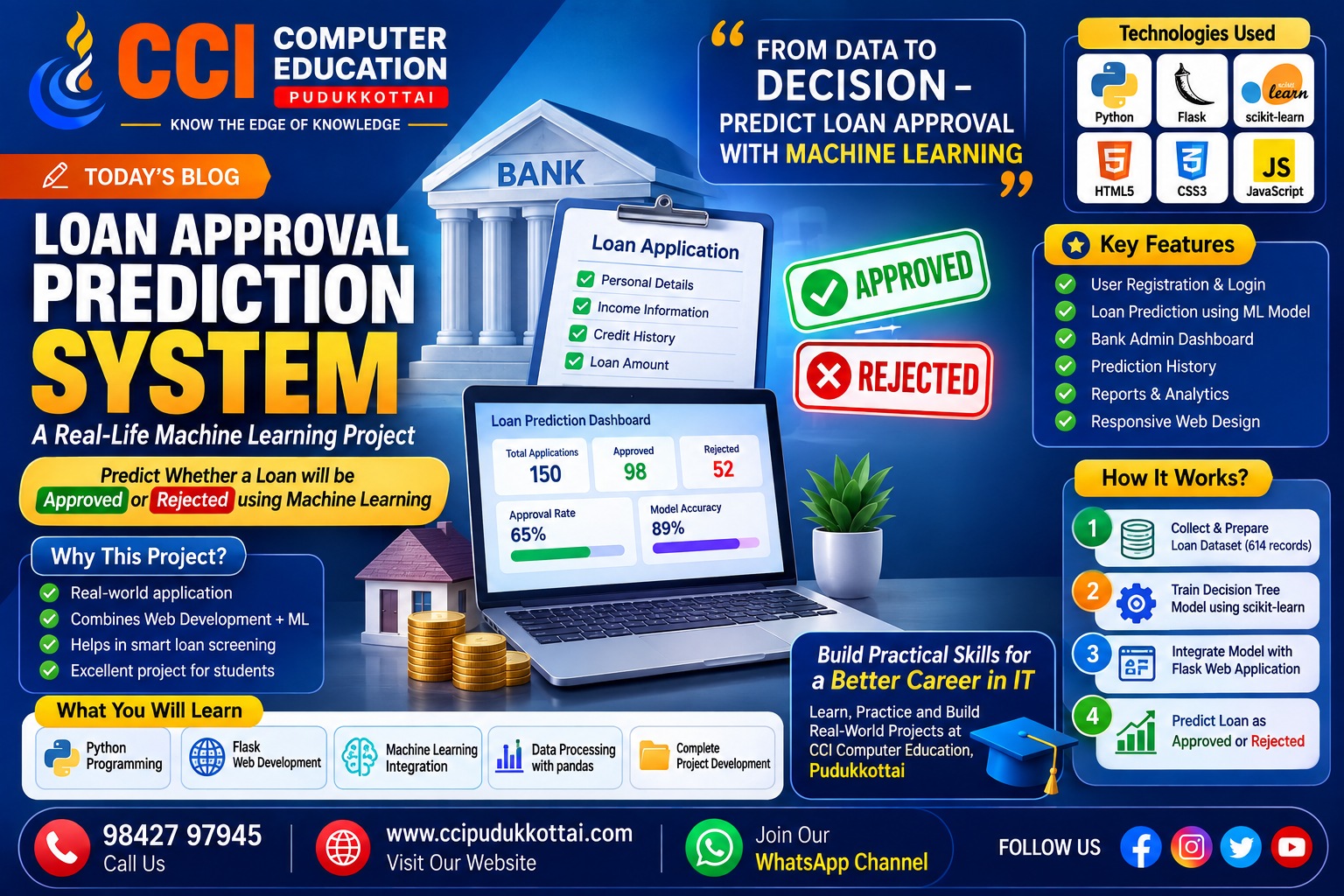
Machine Learning becomes more interesting when we see how it can be used to solve real-world problems. In this blog, we explore a Loan Approval Prediction System, a practical project that combines Python, Flask, Machine Learning, HTML, CSS, and JavaScript.
The system is designed to predict whether a customer's loan application is likely to be Approved or Rejected based on applicant information.
What is the Loan Approval Prediction System?
The Loan Approval Prediction System is a web-based banking application that uses a Machine Learning model to predict loan approval status.
The project uses Python with Flask for the backend, HTML, CSS and JavaScript for the frontend, and scikit-learn for the Machine Learning component.
The project demonstrates how a trained Machine Learning model can be integrated into a web application to provide real-time predictions.
Project Objectives
- Predict loan approval status using Machine Learning.
- Create a user-friendly web application.
- Provide registration and login functionality.
- Display loan statistics through a dashboard.
- Maintain a history of previous predictions.
- Demonstrate Machine Learning integration with Flask.
- Reduce the manual effort involved in preliminary loan screening.
Technologies Used
- Programming Language: Python
- Web Framework: Flask
- Frontend: HTML5, CSS3, JavaScript
- Machine Learning: scikit-learn
- Model: Decision Tree Classifier
- Data Handling: pandas and numpy
- Development Environment: Visual Studio Code
Project Presentation
Want to explore the complete project presentation? Click the button below to view the Loan Approval Prediction System presentation.
Project Structure
The project contains the Flask application, Machine Learning model, dataset, templates, CSS, JavaScript files, and supporting modules.
Loan_Approval_Project/
├── app.py
├── train_model.py
├── loan_model.pkl
├── requirements.txt
├── dataset/
├── output/
├── Loan_Approval.ipynb
├── static/
└── templates/
Step 1: Development Environment
The project was developed using Visual Studio Code. The Flask development server is used to run the application locally.
Loan Approval Prediction System development environment
The development environment shows the project structure and the Flask application running during development.
Step 2: User Registration
The application provides a registration module where a new user can create an account by entering required details such as name, email, phone number, username, and password.
Loan Approval Prediction System user registration page
After successful registration, the user can continue to the login page.
Step 3: User Login
Registered users can log in to the application using their username and password. The login module provides access to the main banking dashboard.
Loan Approval Prediction System login page
Step 4: Bank Admin Dashboard
The dashboard provides an overview of loan activity. It displays information such as total applications, approved loans, rejected loans, and the overall approval rate.
Loan Approval Prediction System bank admin dashboard
The dashboard also includes a visual summary of approved and rejected applications and prediction-related information.
Step 5: Prediction History
The prediction history module maintains records of previous predictions. Users can search the history and access available export and delete options.
Loan Approval Prediction System prediction history
Step 6: Loan Prediction Form
The loan prediction module is the core part of the application. The user enters applicant information such as gender, marital status, dependents, education, employment status, income, loan amount, credit history, and property area.
Loan Approval Prediction System loan prediction form
Applicant Details and Prediction
After entering the applicant information, the data is processed and sent to the trained Machine Learning model through the Flask application.
The system then generates a prediction based on the information provided by the applicant.
Loan Approved and Rejected Results
The system can generate either an Approved or Rejected result depending on the applicant information processed by the trained Machine Learning model.
How Machine Learning is Used
The project uses a Decision Tree Classifier from scikit-learn. The dataset is divided into training and testing data using an 80:20 split.
Before training, missing values are handled and categorical information is converted into numeric form so that it can be used by the Machine Learning model.
The trained model is saved as loan_model.pkl and loaded by the Flask application when the server starts.
What Data is Used?
The project uses a loan eligibility dataset containing 614 historical loan applications.
The dataset contains information such as applicant income, co-applicant income, loan amount, loan term, credit history, education, employment status, dependents, and property area.
Project Modules
- Registration Module
- Login Module
- Dashboard Module
- Loan Prediction Module
- Prediction History Module
- Reports and Analytics Module
- Customers Module
- Settings Module
Project Results
The application was tested from registration through prediction. A user can register, log in, view the dashboard, submit a loan application, and receive an Approved or Rejected result from the trained Machine Learning model.
The project documentation reports a dashboard summary of 150 total applications, 98 approved, 52 rejected, a 65% approval rate, and 89% model accuracy.
What Students Can Learn From This Project
- How Python can be used in real-world applications.
- How Flask connects frontend pages with backend logic.
- How Machine Learning models can be integrated into web applications.
- How datasets are cleaned and prepared.
- How a Decision Tree model is trained and used for prediction.
- How to organize a complete software project.
- How different technologies work together in one application.
Why Real-Life Projects Are Important
Learning programming concepts is important, but applying those concepts in a practical project helps students understand how software is actually developed.
A project such as this can help students connect programming, web development, databases, and Machine Learning concepts with a practical use case.
Learn, Practice and Build at CCI Computer Education
At CCI Computer Education, Pudukkottai, students can develop their technical skills through practical learning and project-based training.
Students can learn programming, web development, databases, Python, Java, C++, Artificial Intelligence, Machine Learning, and other technology skills through step-by-step practice.
Conclusion
The Loan Approval Prediction System is a practical example of how Machine Learning can be combined with a web application to solve a real-world problem.
The project demonstrates the complete flow from data preparation and model training to Flask integration and real-time prediction.
For students, building projects like this is an excellent way to move from learning programming concepts to developing practical applications.
What's Next?
In our upcoming project-focused blogs, we will explore more real-world applications and explain how programming concepts can be used to build practical software projects.
Contact CCI Computer Education – Pudukkottai
Want to improve your programming and IT skills? Join CCI Computer Education, Pudukkottai and learn through practical, step-by-step training.
CCI Computer Education
Pudukkottai's Leading IT Training Centre
Call: 98427 97945 | Website: ccipudukkottai.com | WhatsApp Channel: Join Now
Share: Facebook | WhatsApp | Twitter